Google has just fully integrated AI into your email in its biggest overhaul to Gmail in years. While Google Workspace business users have enjoyed some AI features over the past year, they have now expanded and produce better results than ever before. The upgrades are made possible by Gemini 3, Google’s most intelligent model to date.
AI Overviews Summarize Your Emails
The AI overviews you’re used to seeing in search are now summarizing your emails. When you open an email, you’ll see the AI overview at the top, giving you the gist of what the email contains. This is extremely useful for longer email threads or longer emails.
If you add on a Google AI Ultra subscription to Google Workspace, you can take this a step further by getting an AI overview when you search your inbox, helping you sort through the results to find what you’re looking for faster.
Add To Calendar Directly From Emails
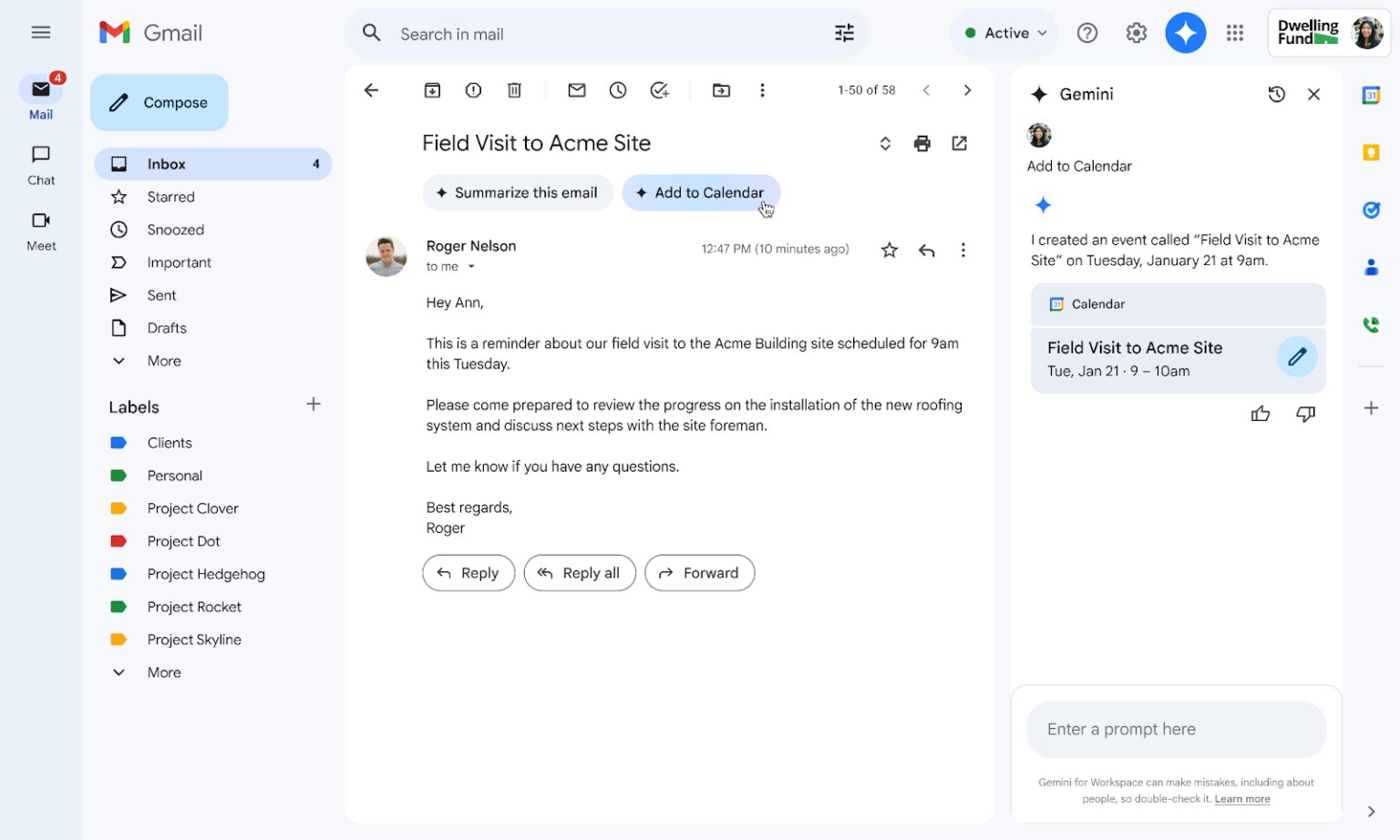
When a meeting is suggested in an email, you’ll see a button at the top of the email that says “Add to Calendar.” When you select it, it will present the option in the Gemini sidebar to create a meeting with all of the people named in the email and the ones who are cc’ed on the email. Gemini will ask when you want the meeting to be if there’s no date suggested and create the event on your Google Calendar.
Suggested Replies and Proofreading
Google business users have been enjoying “Help Me Write” for a while now. This tool, available from an icon on the bottom when you compose an email or reply to one, helps you draft an appropriate response or initial email. Smart replies have also been available for a while; these suggest an appropriate response when replying to an email. They’re having their name changed to “Suggested Replies.” Google is promising to release updates to Help Me Write next month which will bring in context from other Google Apps to improve this feature.
So what’s new? Google AI Ultra subscribers will be able to use a “Proofread” feature to give emails a final polish before hitting send. There’s a hack for this for regular Google Workspace subscribers - just open the Gemini sidebar and ask Gemini to proofread your email, then make the changes it recommends. Or, if you like everything you see, you can just insert the content into your email. The major difference is that the proofread feature will be accessible during email composition, and you won’t have to open the Gemini sidebar.
AI Inbox
This feature hasn’t reached all users yet, with broader rollout expected in the coming months. AI Inbox is an executive summary of everything that’s in your primary inbox, helping you to filter out the clutter and focus on emails mentioning immediate deadlines or that express urgency. You’ll never miss a deadline or urgent request again.
POP3 Email Polling is Discontinued
If you’ve been unifying emails from other accounts in your main Gmail inbox by polling them with POP3, that functionality is now closed off. We’ve covered how to manage this here, but the summary is that you should set up a separate Gmail user for your former POP3 accounts going forward to manage them properly. As a part of the same move, the Gmailify service is also being shut down.
While Google hasn’t offered an official reason for discontinuing POP3 support, it easily ties into security. POP, or Post Office Protocol, was one of the first email protocols created at the dawn of the internet. While its simplicity made it easy to work with, it also made it vulnerable to eavesdropping and other attacks designed to grab passwords and other information from email.
Since Gmail is touted by Google as the most secure widely available email solution, it makes sense that they would want to get rid of it; even if it isn’t the most popular move, it is protecting its customers. Yes, you may have to set up another Google Workspace user, but ultimately, your emails are safer.
Is it Worth Getting Google AI Ultra?
While the new Gmail functionalities being rolled out for Google AI Ultra users are great, they aren’t necessarily things that you need unless you’re a serious email power user. However, you can just choose to get it for the people in your organization that want it - not everyone in your business needs the add-on. Google specifically identifies it as the add-on for “creators, coders, and researchers.”
Google AI Ultra can enable:
- Marketers who want to create lots of AI video content with Veo 3.1 and Flow, instead of just a few videos a month with the standard Google Workspace subscription
- Deeper research in Notebook LM and Gemini for analysts or other professionals who have to dig through a large volume of data, such as lawyers
- Coders who need access to Gemini’s highest levels of coding assistance
When you weigh the cost of Google AI Ultra against non-automated video creation, reducing billable hours spent on research from top-billing professionals, or legacy code creation, the fee for it makes sense. Due to the amount of sheer processing time required to run it, it is unlikely that Google makes it available as part of the usual business Google Workspace plans anytime soon.
Google is constantly introducing more features to elevate even the most basic Google Workspace plans. If you want to put AI and collaboration front and centre for your business, you’re just not going to reach that goal with the competition. Contact us today to get started on your migration, which can be done exactly the way you want it to happen - without business interruptions and minimal churn.
Contact Us to Learn More about Transforming Your Business