AI adoption is moving at the speed of business, and is accelerating rapidly. CEOs and managers want to know how AI is being used at their business and how much it is being used. On the marketing side, you need to know how many visits you’re getting from AI tools, what keywords they’re using in their searches or prompts, and what the traffic is like from Google’s new AI overviews in search.
Google has recently released tools for managers and marketers that let you more easily track AI adoption in your business and AI search traffic, and there are also third-party tools that can give you a more in-depth picture for both.
Tracking Gemini Adoption at Your Company
Most companies are mandating AI use for all roles, from the C-suite to the most junior roles. Google Workspace is now fully infused with Gemini, Google’s hyper-intelligent AI that streamlines everyday workflow and lets your staff do things that they couldn’t before such as generate images, create videos, and even automate low-level tasks.
Google has just introduced reporting that can help you track and report on Gemini use at your business to make sure everyone is taking advantage of Gemini’s immense capabilities. This can help you identify slow adopters who might need more training, and how your star performers are using Gemini to do even better work.
How to Produce Regular Reports on Gemini Use
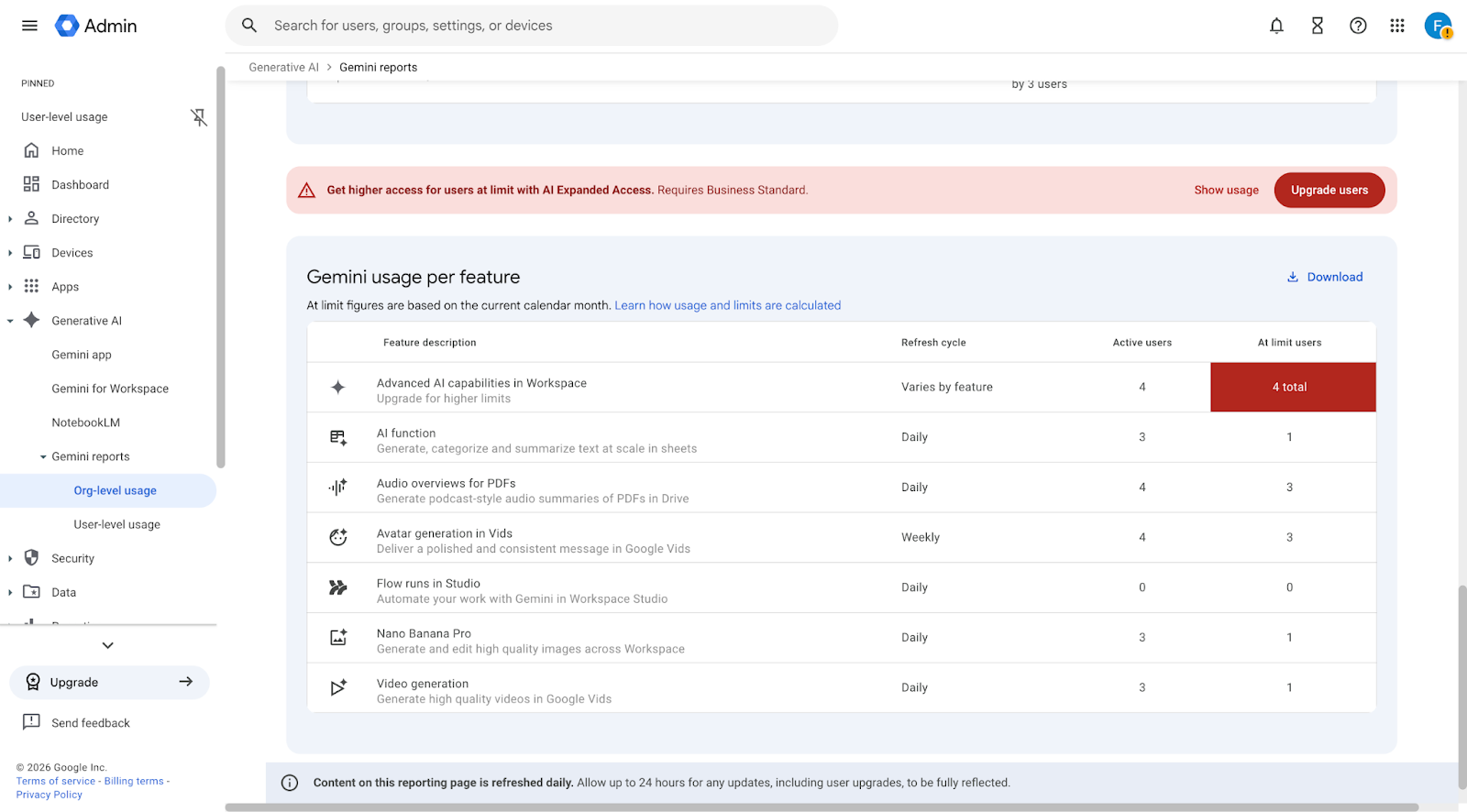
First, you will need to have administrator rights for Google Workspace. If you’re in a larger organization, you may need to ask someone with these rights to download the reports and pass them along to you, as it is not good for security for every manager to be an administrator.
If you do have admin rights, you just need to log into your Google Admin console, and go to Generative AI → Gemini Reports. From there, you can view reports at the organizational or individual user level following the instructions here.
From there, you can get a high-level view for upper management, a departmental view for department managers, or individual user reports on Gemini use. You can see if they are using basic or more advanced features, how much they are using Gemini, and much more.
This will also help you understand if certain users will need their accounts upgraded to AI Ultra. For example, if human resources is consistently producing training videos with Veo, select users in their department may need a subscription upgrade. Same with marketers who are producing high volumes of videos, or coders who may need advanced access to AI.
Third-Party Software: Monitoring vs. Surveillance
If you want to measure the use of other AI tools in addition to Gemini, you may want to look into a third-party solution, but you want to avoid surveillance tools. While most employees accept that they are under some level of monitoring, you don’t want to start engaging in employee surveillance. This erodes trust and decreases engagement.
There are several tools on the market that can tell you at a high level what usage rates are like for your AI technology solutions without tracking every online move. The good ones simply run in the background and report on tech use both in the cloud and on a desktop. The bad ones log everything, such as keystrokes or screenshots of what staff are doing, and are generally used more for low-trust or high-security environments, not in a standard office setting.
How to See AI Traffic to Your Website
A marketer’s worst nightmare at the moment is reporting on AI referral traffic, especially since Google AI Overviews are the new top result on the search engine results pages. Luckily, Google has recently rolled out free tools to allow you to at least get a general idea of what is going on.
If you are a business owner rather than a marketer, you may have Google Analytics, but you may not yet have Google Search Console. It is a separate tool that reports only on search results, and you’ll definitely want it to track AI traffic since its capabilities have not yet been replicated in Analytics. It’s free to install and easy to do, just follow these steps.
Google Search Console
Google Search Console has just introduced AI-powered configuration, which allows you to see what kind of traffic all AI tools, including Google AI Overviews, are sending to your website.
Go to “Performance” and click on the blue funnel icon which reads “Customize your report using AI” at the top right, underneath “Export”. Then, enter a prompt like “Show all traffic from AI tools” or “Show all visits from AI” and you’ll get a detailed breakdown which helpfully includes the keywords used. The only thing it doesn’t do is separate out exactly how much traffic is coming from each tool, but you can at least get that metric for ChatGPT with Google Analytics.
Google Analytics: See ChatGPT Traffic
This method will allow you to see when ChatGPT is used. To do this, click Generate Leads → Traffic Acquisition. Then, in the drop down directly underneath the chart, select “Session Source / Medium”.
This will then show all of the URLs where you are getting referral traffic from, including ChatGPT.
Third-party tools to measure AI search traffic give the same kind of “broad strokes” data, but they do quantify the results in a way that’s more presentable to your client or boss. Most tools used for SEO metrics include options to track AI traffic, so if you’ve been considering getting them, now may be the time.
If you need help setting up Gemini reporting, or want to know if you need to upgrade to get more AI access, get in touch with us. UpCurve Cloud is one of Google’s most forward-looking partners, helping hundreds of businesses just like yours stay ahead of the AI curve.
Contact Us to Learn More about Transforming Your Business