
Google released a number of useful features for Google Workspace in 2025. In fact, there’s so many it’s been hard to keep track. We’ve rounded up the 2025 updates that have been most useful for businesses for everyday operations. Make sure your team knows about them so you’re getting the most out of Google Workspace.
1) Gemini in Docs, Sheets, and Slides
By far the most useful update in 2025 is a tough one to miss - having the Gemini sidebar available in Google Docs, Sheets, and Slides. This native integration brings the power of Google’s superior AI solution, Gemini, to the apps we use regularly.
All you have to do is click the Gemini starburst logo beside your profile picture at the top right of the screen to open the sidebar, and from there you can use Gemini to do anything you want. Remove duplicates from spreadsheets, reformat a document instantly, rephrase an important letter, edit a blog post, or whatever you need to do. If you want to extend the capability of Gemini beyond what can be done in the sidebar, you can load up the standalone app by visiting gemini.google.com.
2) Gemini 3 Upgrade
Gemini’s latest model, Gemini 3, leaves the competition in the dust. OpenAI lost 6% of its users in a week after Gemini 3’s release in mid-November on the strength of Gemini 3’s superior performance against ChatGPT and its native integration with Google Workspace apps.
While ChatGPT tried to catch up with a new release, PC Mag declared it more of the same, while Gemini 3’s upgrades were far more substantial. They specifically listed:
- Nano Banana Pro, Gemini’s AI image generator
- Deep research with Gemini faster, more concise
- More affordable than ChatGPT for power users who need more (e.g. coding) than the free version of Gemini included with Google Workspace
What does that all mean for the average Google Workspace user? You’ll get answers faster, Gemini-generated writing is better, and Gemini’s AI-generated images are the ones to beat on the market right now, with no sign of anyone else catching up.
3) Google Meet: Ask Gemini for Meetings

We’ve all been there. You join a meeting late and have no idea what everyone is talking about. With “Ask Gemini” you don’t have to be in the dark. Just click on the Gemini icon and ask Gemini for anything you want, from the meeting transcript up until you joined to summarizing key takeaways.
Admins and meeting hosts should follow the instructions given by Google to make sure Ask Gemini can be used by participants to its fullest advantage - mostly just don’t turn it off and make sure “Take notes with Gemini” is enabled in the meeting.
4) Appointment Booking Link in Google Calendar
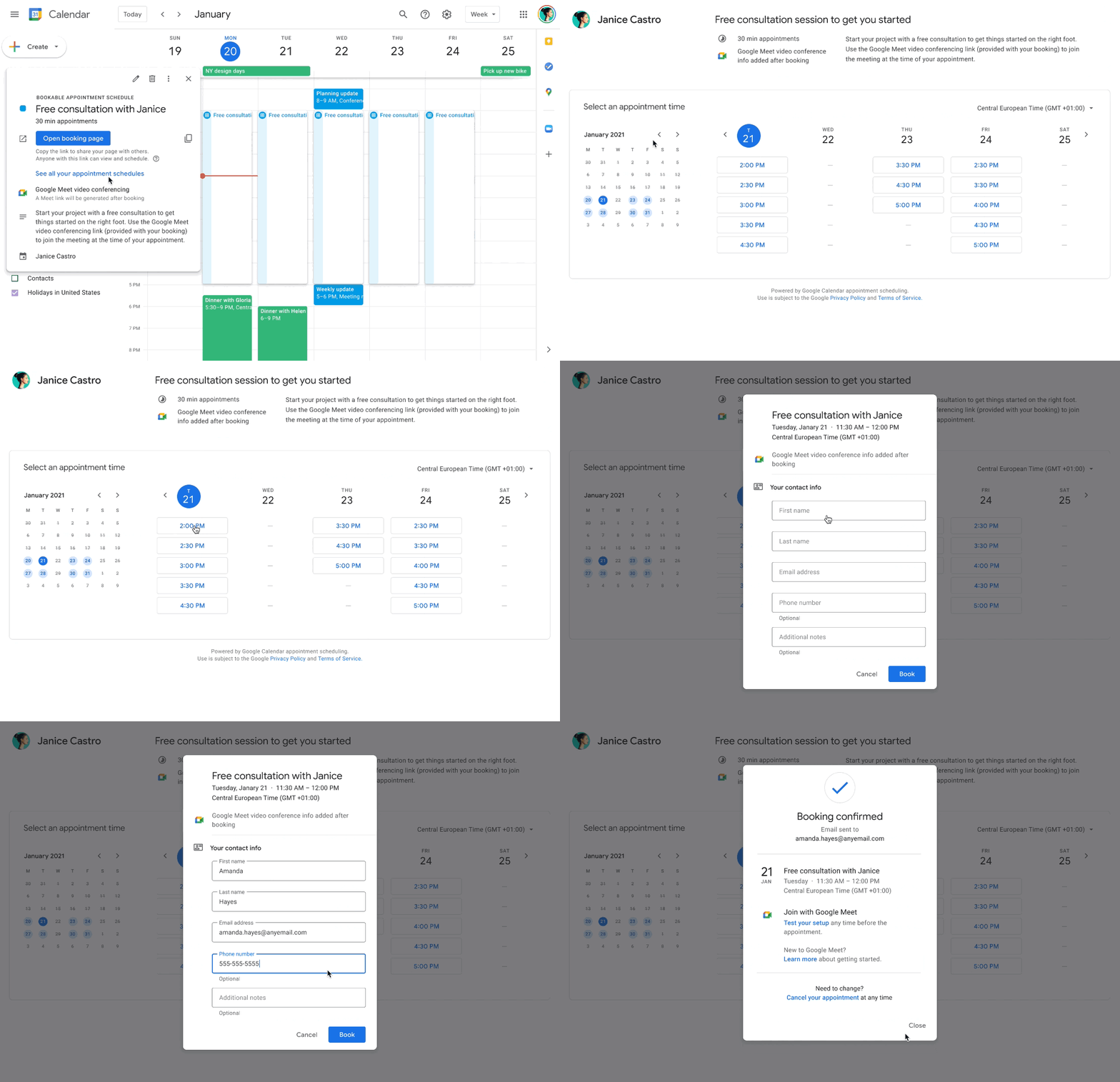
You don’t need a subscription to a scheduling app anymore, even if you want to do things like accept payments for appointments. All you have to do is set up your appointment booking link in Google Calendar by following these simple instructions, then cut and paste it anywhere you want someone to be able to book a meeting with you; your email signature file, your website, and so on.
Reducing your tech stack spend is never a bad idea, and Google will probably continue to roll out features that are currently being served by third-party tools. Additionally, your booking link will be less likely to be subject to error or downtime since it is more deeply integrated with your Google Calendar.
5) NotebookLM Plus: Your AI-Powered Research Partner
If you’re a regular Google Workspace user that doesn’t venture too far outside of the usual apps, NotebookLM is definitely worth a side quest. While this tool technically rolled out at the end of 2024, Google has made numerous improvements to it which allow you to do things like easily create podcast-style audio overviews, synthesize a group of longer documents into an executive summary, and much more.
While you could use the Gemini app to do all this, NotebookLM lets you organize everything into notebooks, keeping your work organized and creating a resource you can call back on later. Plus, you can share your notebooks with people in your organization, making it a must for creating and sharing things like training guides, brand guides, and anything else that you need a central resource for. If you’re not using it yet, make checking it out a priority for 2026.
6) Google Workspace Studio
Everyone is talking about agentic AI, which is the automation of common work processes with AI agents. Gemini allows you to do this right now with the creation of Gems, but Google just made this process accessible and easy for everyone with Google Workspace Studio. This new, exciting feature gives you a place to create your own custom AI agents. Gems are still the backbone of the process, but it’s been simplified by Google so you can just tell Studio what you want it to do and it will create your AI agent.
Admins don’t have to worry about users creating their own agents, because your company data is aggressively firewalled by Google. This was definitely a concern with third-party agentic AI solutions, and Google has solved it by rolling out their own easy-to-use interface.
If you’ve already created Gems using the Gemini app, no need to panic. They’re still in play and will be for as long as you need them. If you can’t access Studio yet, you should be allowed in by the end of January 2026. Unsurprisingly the demand is high for this solution and it’s also free for all paid Google Workspace users.
Are you looking to switch to the solution that has the best AI features and is continuously rolling out more? Get in touch with our team! As a longstanding Google Partner, we’ve helped companies from all sectors and all sizes to migrate to the solution that makes sense: Google Workspace.
Contact Us to Learn More about Transforming Your Business