
If your team lives in Google Workspace but your external partners, vendors, clients and even some staff still rely on Microsoft 365, you are dealing with more layers to your work than you want to have.
Downloading a .docx file, converting it, editing it, and exporting it back out just to reply to an email slows everyone down. Of course, you can share a file link, but it’s not as easy to share and collaborate on files in Microsoft 365 as it is with Google Workspace.
Google has recently rolled out a major wave of updates designed to make Google Workspace and Microsoft 365 play nicely together, whether it’s for sporadic collaboration across platforms a full migration to Google Workspace
Edit Microsoft Files Directly in Workspace
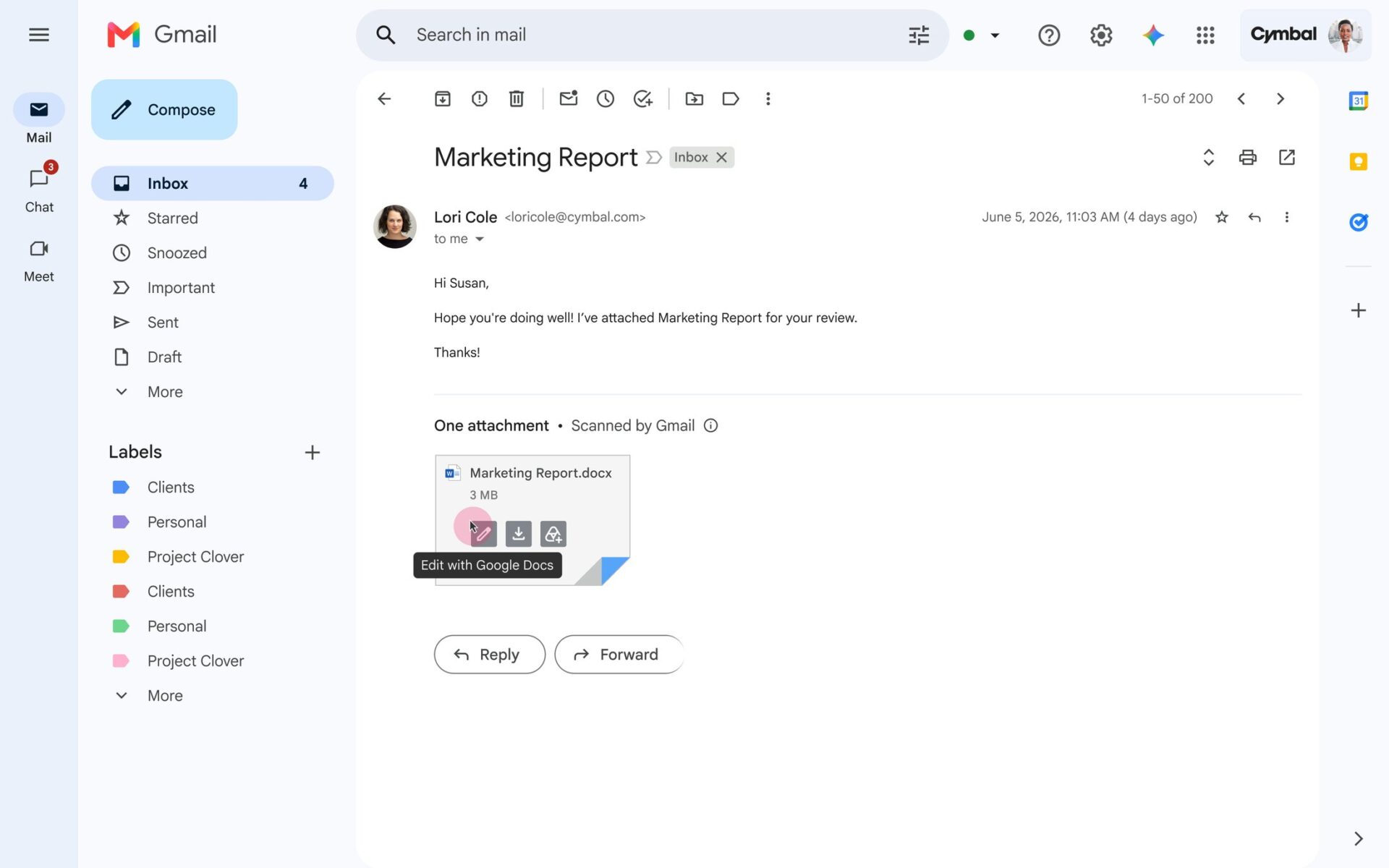
In the not-so-distant past, receiving an Office file meant leaving your workflow to handle it. Google is eliminating those extra steps so you can keep working without worrying about file formats.
- Office Editing inside Gmail: Starting in beta in 2026, you can edit Office files directly within Gmail. If a client sends you an Excel spreadsheet or Word document, you can manage the versions and edit the content right from your inbox, speeding up reply time.
- Advanced Word Compatibility in Docs: Google Docs is getting much smarter about Microsoft Word’s native formatting. It now supports complex features that heavily .docx-reliant professionals (like lawyers and engineers) use daily, including captions, cross-references, and small caps.
- Native Redlining: By late 2026, Docs will support robust contract redlining workflows. Legal and finance teams will be able to do all their drafting, commenting, and redlining entirely within Docs, even when negotiating with partners using Microsoft Word.
Finally Convert Excel Macros and Ditch the VBA
If you have hesitated to move heavy analytical workloads from Excel to Google Sheets, the latest performance upgrades remove the most common roadblocks.
- Massive Data Handling: Sheets has doubled its capacity from 10 million to 20 million cells. On top of that, working with large spreadsheets (over 1 million cells) is now drastically faster—they load up to 30% faster, and filtering or conditional formatting is up to 60% faster.
- AI-Powered Macro Conversion: Got a library of old Excel VBA scripts? The new Macro converter uses Gemini to automatically translate your legacy Microsoft VBA scripts into Google Apps Script, saving you from having to manually rewrite your automations.
- Sheets Canvas: This new feature lets you turn static Sheets data into custom, interactive mini-apps like Kanban boards or heat maps without writing any code. It replaces the need for clunky third-party Excel add-ins.
Frictionless Meetings and Presentations
Have you ever imported a PowerPoint presentation only to find the embedded videos broke? Google Slides now natively supports importing and playing embedded audio and video directly, preserving the original PowerPoint experience.
If your conference rooms are outfitted with Google Meet hardware, you no longer have to scramble when someone sends a Microsoft Teams invite. Meet hardware now supports one-touch or direct guest joining for Teams (and Zoom) calls.
New Tools for a Full Migration
If you are using these interoperability features as a stepping stone to completely move your organization from Microsoft 365 to Google Workspace, Google has completely overhauled the backend migration process.
- Data Import Service: This built-in, cloud-native tool makes migrating from Microsoft 365 to Workspace up to five times faster. It handles the heavy lifting, including Microsoft Teams data, encrypted files, and complex metadata like Outlook rules, calendar settings, and sensitivity labels. This service is now baked into the Google Admin console.
- Migration Planner: Before you even commit, you can use the open-source Migration Planner, downloadable off of Github. It runs locally on your machine (meaning Google doesn't see your data) to scan your environment, batch your users, and generate an accurate, data-driven timeline for the move. Once you're ready, it produces a one-click execution plan.
You don't have to force anyone to change the software they use. With these new interoperability features, you can keep your team moving fast in Workspace while doing business with the Microsoft 365 world.
If you are planning a full migration, it’s easier and less risky to hire a partner like UpCurve Cloud to manage it. We’ve migrated thousands of businesses to Google Workspace, and we’ve been a Google Partner since way before it was even called Google Workspace. Contact us and get our friendly experts on your team to get it done right.
Contact Us to Learn More about Transforming Your Business