
Taming your digital clutter just got a whole lot easier. Google has officially announced general availability for the "Organize My Files in Drive" feature which is designed to help you take control over your Google Drive organization by using AI to streamline file management.
Following a successful beta launch in October 2025, this feature is now rolling out to most business Google Workspace subscription tiers. It acts as a digital organizer, scanning your Drive for stray files that have drifted outside of your structured folders and providing intelligent recommendations for where to put them.
How To Use it in Google Drive
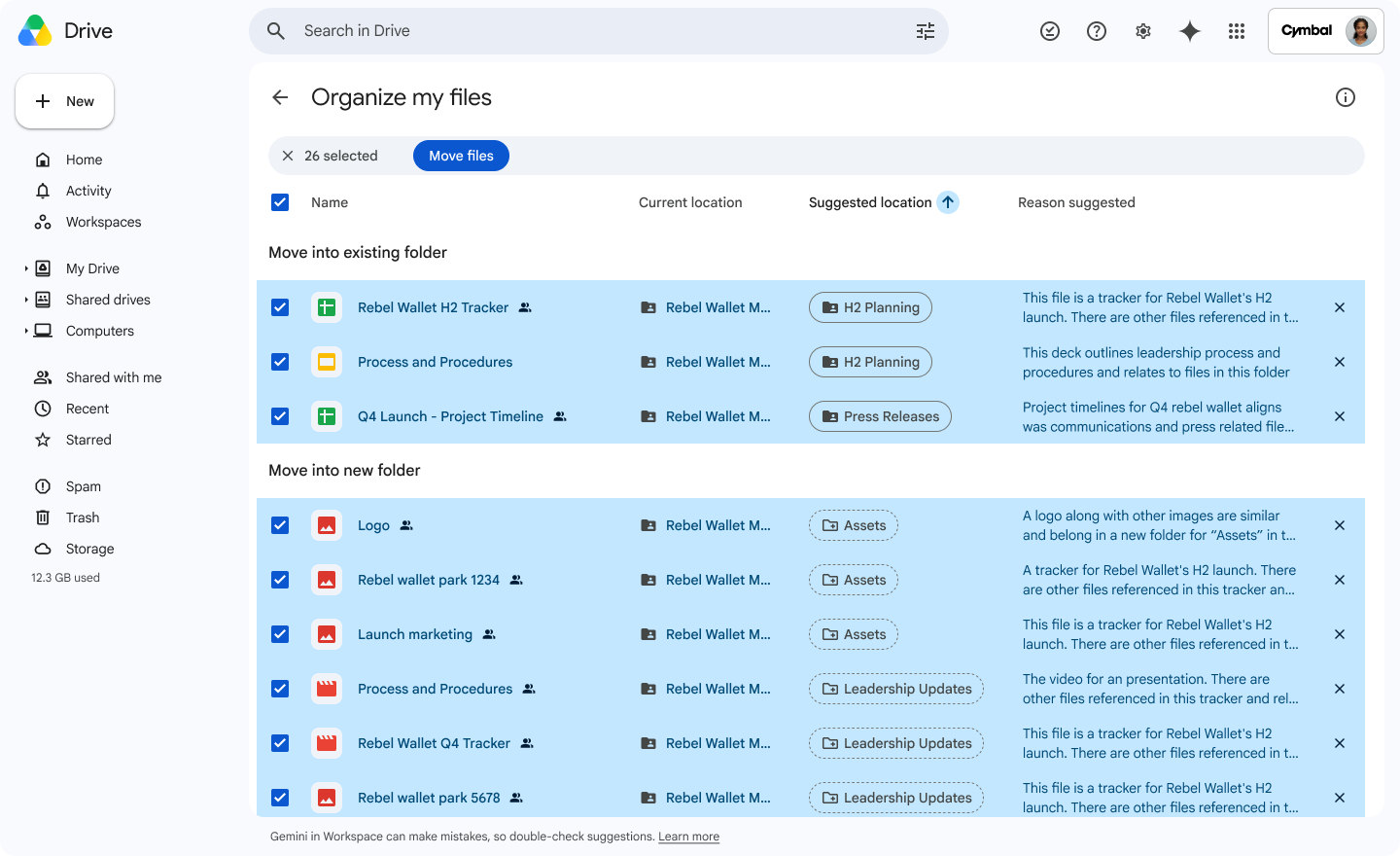
You can access this feature through the "Suggest File Moves" interface, which appears within My Drive and parent folders.

Gemini analyzes your existing organizing strategies to suggest the best destination for your files. It will either recommend moving them into existing folders or suggest creating new, logically grouped folders to house them. It will even automatically create those folders for you.
You are always in the driver's seat. The interface allows you to review, select, or deselect any suggestion via checkboxes and hovercards. You can even customize target destinations or rename proposed new folders before any changes take effect.
Once you’ve reviewed and approved the suggestions, the system performs a batch move, keeping your files organized without the tedious manual drag-and-drop process. It will even prompt you to confirm any permission changes before finalizing.
Why You Want to Use It
If you have files existing outside of folders that should be in a folder, and you want to share those folders with colleagues or clients, those files will be missing. Additionally, lots of users just create files in My Drive without assigning them to folders, which can lead to digital chaos if you ever do need to share those files or organize hundreds of files after a few years of operating this way. If you use this automated feature, you’ll prevent your files from being stuck in a silo and being a pain to organize in the future.
Google Drive AI Search
Another useful feature that was released recently for Google Drive is AI search. With AI Search, you get rich results at the top of your usual search results that usually get you to the file you are looking for faster. Once your search is complete, you can Ask Gemini about the files that were returned as results.
A good use case for this would be if you searched for several files on a niche topic, you could ask Gemini something like “Which of these files has the highest quality content?” This will help you choose the right document right away without opening all the returned results.
Availability and Getting Started
To get started, ensure your administrator has Gemini for Workspace enabled, and make sure you have enabled Workspace smart features in your own personal account settings.
If you’re looking to tidy up your Drive, now is the perfect time to start. Google is offering a promotional period with higher AI usage limits through July 15, 2026, so you can tackle your entire backlog of unorganized files during this window.
If you want to get started with Google Workspace, or upgrade your Google Workspace edition to get more AI capabilities, contact us today! Working with a Google Partner means you have a person you can always talk to if you have any questions or need support.
Contact Us to Learn More about Transforming Your Business