
The way we work in Google Docs is leveling up. Google Workspace just announced two game-changer updates for Google Docs, both powered by Gemini. You can now generate and edit graphics and photos in Google Docs and untangle comment threads with AI-powered comment workflows.
Whether you’re managing complex team feedback or trying to visualize a data-heavy proposal, these new features will improve collaboration and productivity at your firm.
Generating and Editing Visuals Directly in Docs
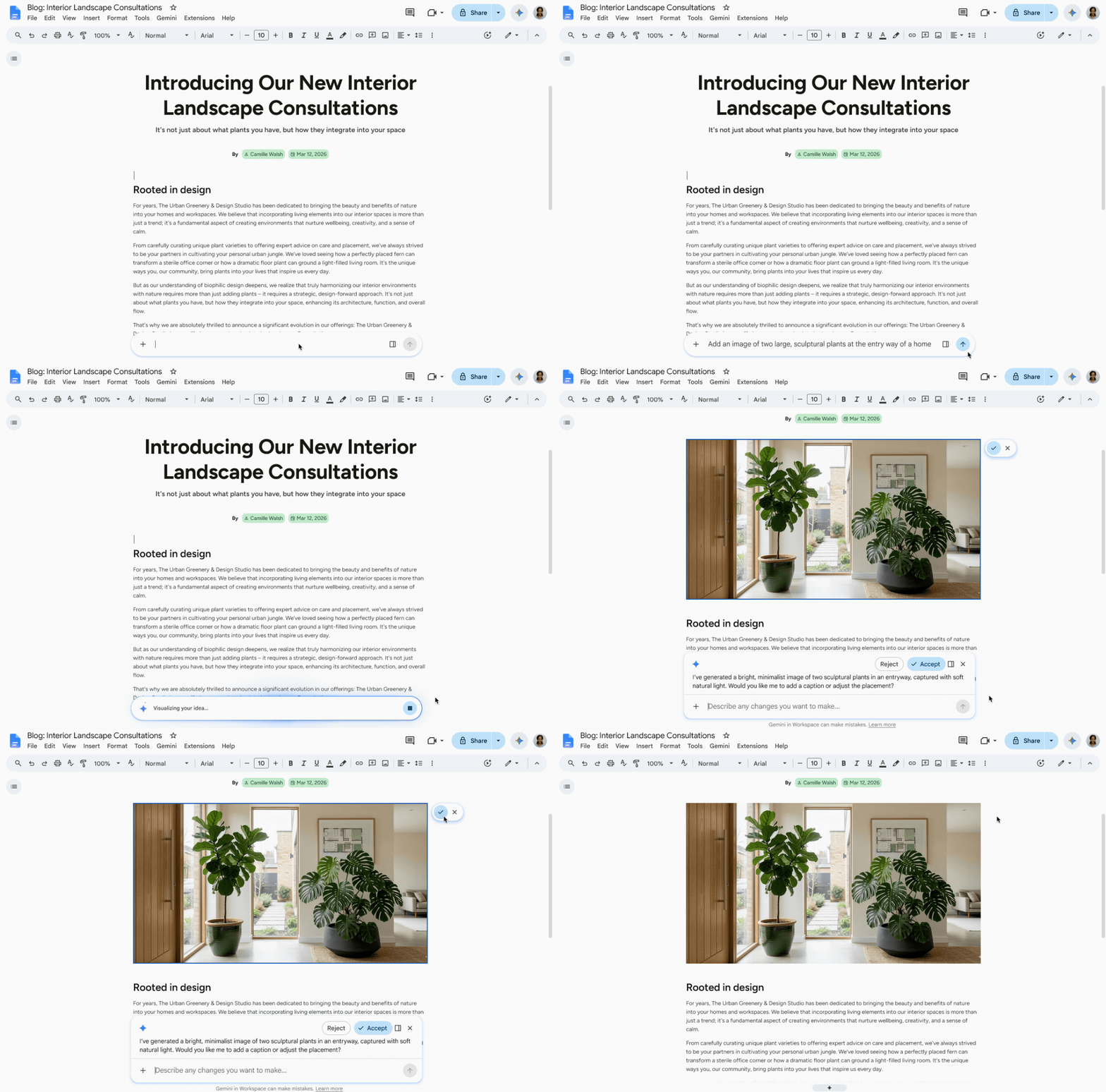
Text is powerful, but visuals often communicate complex ideas much faster. Until now, adding custom infographics or diagrams meant leaving Google Docs, using a separate design tool, and importing the image when it was done. With Gemini’s new visual generation capabilities, you can create and refine pro-level graphics without ever leaving your document.
Create Context-Aware Infographics and Diagrams
Need a visual summary of your project plan? Ask Gemini to "Add a diagram providing an overview of the proposal at the top of my doc" or "Create a rich infographic visually summarizing my doc." Gemini reads your content and builds a custom graphic that matches your data.
Refine Existing Visuals with Natural Language
You don't need to be a graphic designer to level up your images. Just tell Gemini what you want to change. You can say "Change the aspect ratio to 16:9" or "Make the style match the rest of the images in the document."
Bulk Edit and Create
If you have a long, text-heavy document, you can ask Gemini to add infographics to each key section automatically, or update the styling of multiple existing visuals all at once to ensure a cohesive look and feel.
While it’s handy to do this in Google Docs, if you don’t like the results you are getting jump over to the Gemini app at gemini.google.com. It can create more advanced images.
Streamlining Collaboration with Gemini-Powered Comments
If you’ve ever opened a document to find dozens of unresolved comments from multiple stakeholders, you know how overwhelming the review process can be. Gemini is now tackling this by acting as your intelligent comment assistant.
Available via the Gemini side panel or the bottom middle bar in Google Docs, the new comment workflows allow Gemini to read, summarize, and even act on the feedback in your document.
Synthesize and Act on Comments
Gemini eliminates the need to manually scroll through lengthy comment threads by providing instant summaries and identifying key issues. Users can ask Gemini to synthesize discussions, extract specific themes, or list unresolved points from particular stakeholders, making the review process much more efficient.
Review the Document and Add Comments for you
Acting as a specialized reviewer, Gemini can automatically add comments to a document based on your instructions. Whether you need a copy editor's perspective on narrative flow or want to assign a verification task to a teammate, Gemini correctly manages the manual placement of feedback based on your prompts.
All you need to do is review the comments to make sure they are ones you would leave yourself. AI will make suggestions because you’ve asked it to, and they may not be the right ones.
Let Your Drive Files Inform Your Comments
Gemini can help you draft replies to open comment threads using context from across files in your Google Drive. It can automatically pull in relevant files, such as decks or documents from Drive, to answer questions accurately and save you the time spent searching for supporting information. Let’s face it, sometimes your comments need to be defensible, and this allows you to easily find the data to back up your positions.
Suggest Document Edits
To address feedback faster, Gemini can generate suggested edits directly within the document. Instead of manual rewriting, you can instruct the AI to revise specific sections to incorporate reviewer suggestions, allowing you to review and apply improvements with a single click.
To make things even faster, you may start seeing proactive nudges in Google Docs, such as automated prompts to summarize comments when you open a heavily annotated document, or suggesting replies the moment you click into a thread.
Availability and Rollout
Both of these features will be widely available by mid-August 2026.
Who can use it?
- Comment workflows are currently available for users who have edit access to the document.
- These features are accessible to Business (Standard/Plus), Enterprise (Standard/Plus), and Education (Plus) customers, as well as Google AI Pro and Ultra consumers.
- Administrators will find these features on by default if Gemini for Workspace in Drive is enabled, and end-users must have Workspace smart features turned on.
By removing the busywork from document reviews and putting a graphic designer right inside your toolbar, Gemini is ensuring that your team's energy is spent on ideas and not the busy work of resolving/locating/working with comments.
If you want to work with Google Docs and all the other Google Workspace apps that allow you to use AI for almost anything you want, contact us today. We can migrate your organization from the competition to the solution that large and small businesses are switching to in droves after discovering Google Workspace’s many AI features that the competition just doesn’t have.
Contact Us to Learn More about Transforming Your Business