Generative AI is moving beyond simple chat windows. Google recently introduced Workspace Intelligence, an underlying AI system designed to give Gemini a real-time, comprehensive understanding of your work across the entire Google Workspace suite. This innovation represents a fundamental shift in how we interact with productivity tools, moving from manual prompting to a system that is naturally "grounded" in your organization's data.
What is Workspace Intelligence?
Workspace Intelligence is a sophisticated knowledge graph that stitches together Gmail, Docs, Sheets, Slides, and Drive into a single, readable context for Gemini. This eliminates the need for you to provide context for every query.
Imagine drafting a project update: instead of searching for various files and copying snippets, you simply ask Gemini in Docs to draft the report. Workspace Intelligence consults your relevant meeting notes, documentation, and chat discussions to produce a draft in seconds, complete with full citations. While this functionality existed before Workspace Intelligence was introduced, the results are now more precise.
TechRadar calls it an “intelligence layer.” Its purpose is to make Gemini work better in Google Workspace, reducing the need for AI agents to automate work, and even tying in third-party applications. Workforce Intelligence early adopters are Asana, Jira, Hubspot, and Salesforce.
While it does have added features, it is simply a rebrand and a way of categorizing several AI features that Google has already rolled out in Workspace, including AI Overviews in Gmail and new AI capabilities in Google Drive.
Where Can I See Workplace Intelligence in Action?
Workspace Intelligence runs in the background of Google Workspace and ties everything in your apps together, rather than being an app in and of itself. In addition to being Google Workspace’s “intelligence layer”, it is accessible from any Google app or on any device, meaning that every app is now bringing in exactly what it needs to when you ask Gemini anything.
One of the places you can explore Workplace Intelligence and its third-party integrations is in Google Chat, where you can get a summary of your day across Google Calendar, your email, and any third-party tools you’ve integrated. Heads up, if you want to integrate any third-party tools, you’ll need admin access.
Administrative Control and Security
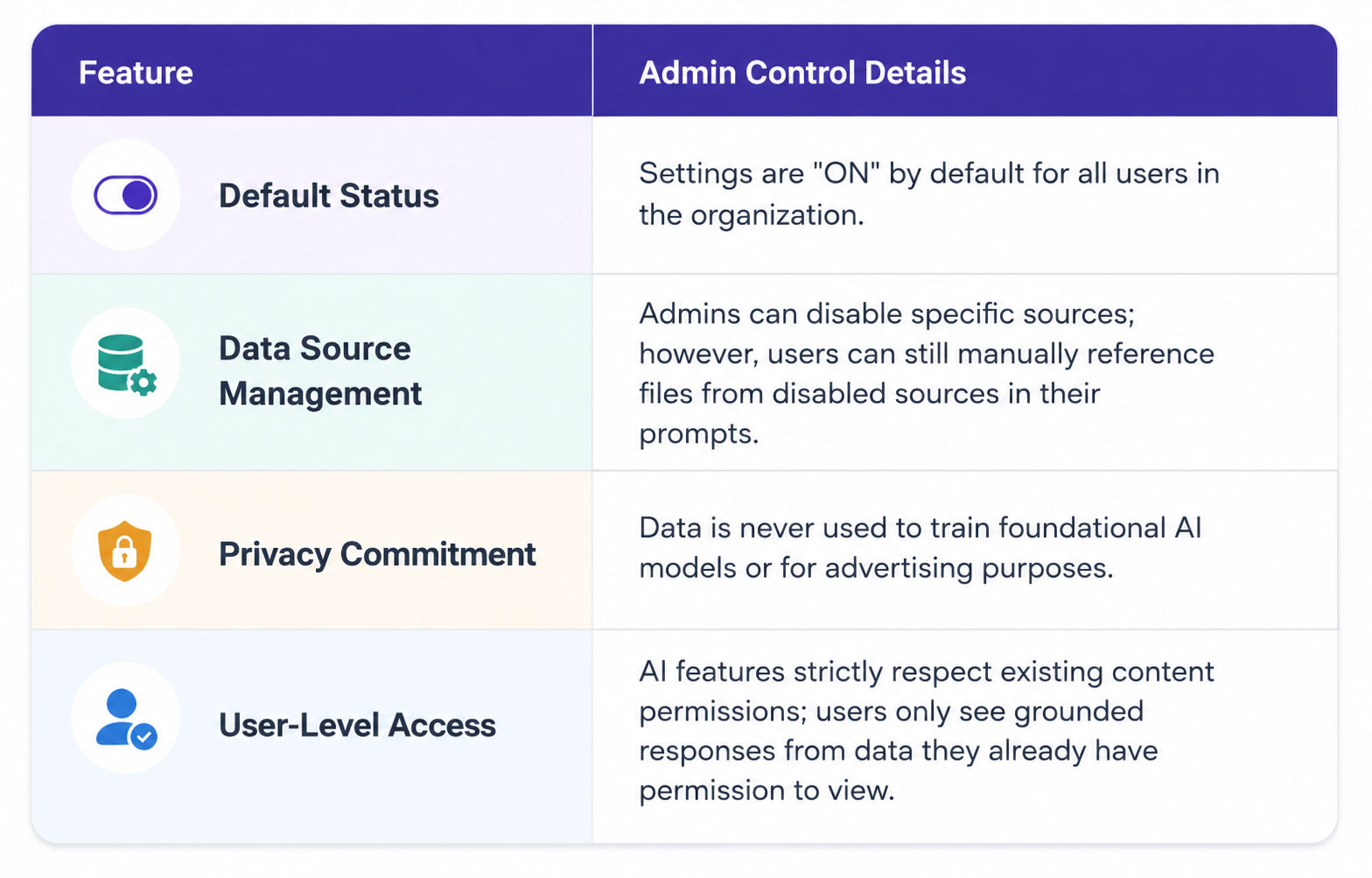
Google has introduced robust admin controls to ensure this tool, as with anything Google makes, is deployed safely. Admins can decide at the organizational unit or group levels which data sources (Gmail, Chat, Calendar, or Drive) Gemini features are allowed to search.
Getting Started
The rollout for these new controls began on April 22, 2026. No action is required to maintain the default settings, but organizations are encouraged to review their data source permissions in the Admin console.
Contact UpCurve Cloud today about migrating to Google Workspace, or if you have any questions about expanding your use of AI in Google Workspace or Google Cloud. We’re fresh back from Google Cloud Next ‘26, where we got up to speed on everything new from Google.
Resources
- Read the whitepaper about Workspace Intelligence.
Contact Us to Learn More about Transforming Your Business