If your organization relies on Google Workspace and uses Gemini to boost productivity, ensuring compliance and managing eDiscovery just got much easier. Google has officially announced that Google Vault now supports eDiscovery filtered exports for Gemini in Workspace. This means that employee AI chats and prompts will now be “saved” for eDiscovery purposes.
Who is This For?
Any regulated industry, such as financial services or legal, should be keeping eDiscovery records in the event of any legal disputes or to satisfy compliance requirements. If you don’t have it set up yet, you can get it here.
What’s Changing?
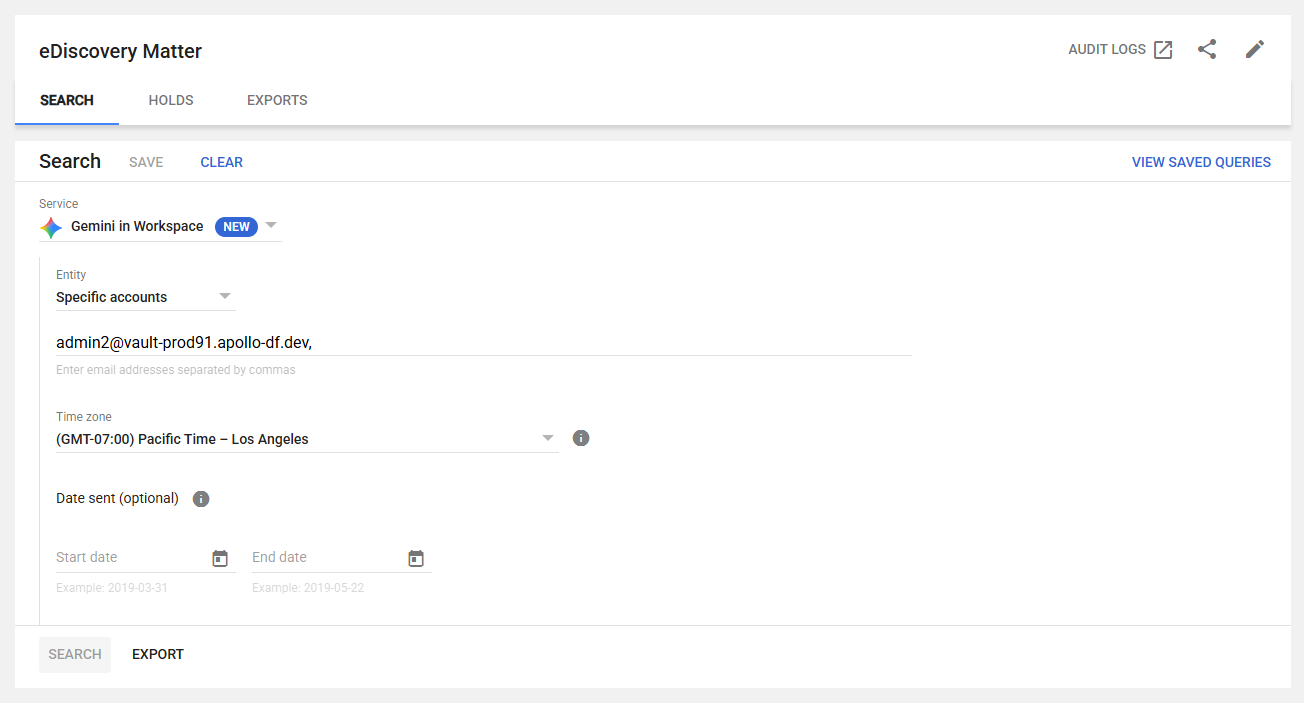
Google Vault administrators can now search, filter, and export user conversations with Gemini across Workspace applications (including Gmail, Drive, Docs, Sheets, Slides, and Meet). Some of the features include:
Targeted Filtering
Admins can narrow down exports by specific criteria, such as the custodian (user), date range, and time zone.
Rich Conversation Context
The exports provide a comprehensive view of the interactions. They include the user's prompts, the AI's responses, generated attachments (such as images), citations, and links to referenced Workspace files (like Drive documents or Gmail threads).
Standardized Export Format
Data is exported in JSON format, and the metadata tags seamlessly align with the GenAI conversation format used directly in the Gemini app.
The Importance of Saving AI Chats and Prompts for eDiscovery
As AI tools like Gemini become integrated into daily business, managing the generated data for compliance, legal holds, and internal investigations is critical. By adding Gemini conversations as a supported data source with robust filtering options, organizations can streamline their eDiscovery processes without having to sift through massive amounts of irrelevant data.
Via the User Interface
Admins can initiate this directly from the Search tab in Vault. Simply select Gemini in Workspace from the service dropdown menu, enter your specific filter criteria, and click Export.
Via the API
If your organization manages Vault via API, support for these new exports will be available within 14 days of the UI rollout.
Available Now to Higher-Tier Business Plans
It is now accessible to business customers on the following Workspace tiers:
- Business: Business Plus
- Enterprise: Enterprise Standard, Enterprise Plus, and Enterprise Essentials Plus
- Add-ons: Customers with the Google Vault add-on
If you would like help setting up Google Vault for eDiscovery or just setting it up in general, contact us for an estimate. It is a bit of a complex process and something you may want to hand over to a third party firm unless you have significant in-house IT resources. If you are on a lower-tier business plan, you may want to consider upgrading to Plus not just for this, but many more features. Get in touch and we’ll be happy to help.
Contact Us to Learn More about Transforming Your Business