
Finding critical information has long been one of the most persistent drains on daily workplace productivity. For busy professionals, getting a quick answer often requires digging through endless, multi-message email threads and constantly switching between individual messages, all while trying to multitask or commute with limited hands-free capability.
To solve this problem, Google announced the October 2026 expansion of two major capabilities for paid Workspace users: Gmail Live and AI Inbox. Together, these updates mark a fundamental shift in how professionals interact with their email, transforming Gmail from a static repository into an active, conversational assistant that surfaces actionable insights automatically. Long story short; you can now compose a meaningful email with your voice and you can say goodbye to manual ways of sorting and digging through your email.
1: Hands-Free Inbox Querying via Gmail Live
The launch of Gmail Live on mobile devices brings conversational AI to the inbox. Powered by Google’s latest Gemini models, Gmail Live delivers an AI-powered voice search experience.
To get started on supported mobile devices, end users tap the Live entry point in the Gmail search bar to initiate a session—with first-time users prompted to grant microphone access upon tapping the icon. From there, your people can ask natural questions hands-free and hear synthesized audio answers on their phone.
Gmail Live also introduces key customization and verification controls. Users can select their preferred voice within Gmail Live, and an email source card is surfaced at every conversational turn, allowing users to inspect the exact emails from which the answers are drawn.
Common real-world query examples which could be used for Gmail Live include:
- “What is the order status for Shawnigan Tool Supply?”
- “When is my next mandatory training due?”
- “Show me the latest update from my manager, John.”
- “What gate is my flight leaving from tomorrow?”
By combining real-time audio responses with verified source cards, Gmail Live transforms mobile productivity. It converts fragmented, written email archives into an accessible audio knowledge base, letting your staff securely query critical data while on the move without ever losing sight of the underlying email sources.
Does this mean you can compose an email while driving? The answer is yes for a simple email. For anything requiring more context or information, you’ll want to consult the source cards and tweak it manually.
2: Automatic Deliverable Extraction with "Suggested To-Dos"
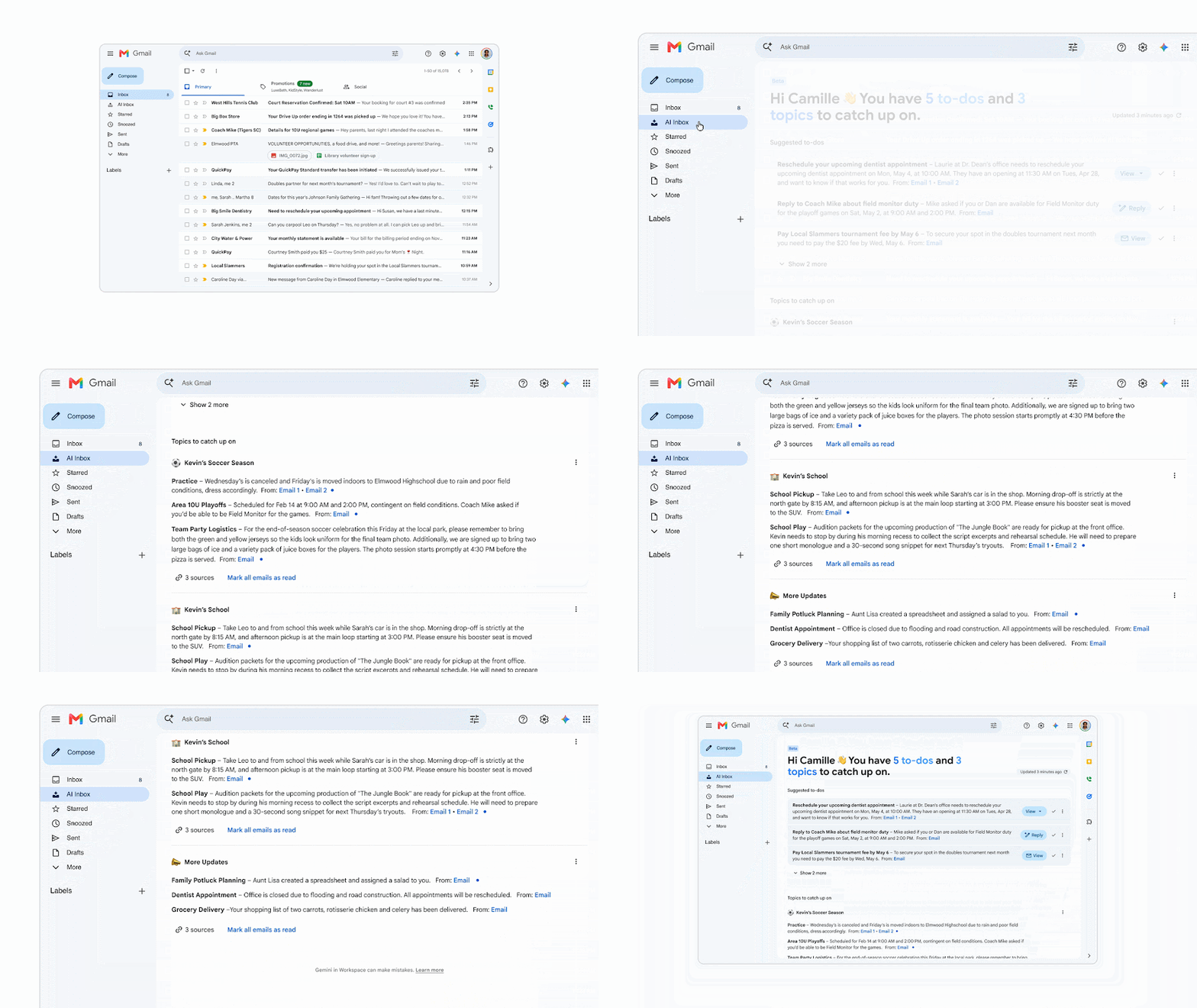
With the newly expanded AI Inbox, Google is addressing task oversight through a core capability called "Suggested to-dos." This feature automatically analyzes email conversations to extract embedded deliverables, deadlines, and actionable items.
Instead of requiring users to manually flag messages, transfer tasks into separate apps, or take meeting notes, AI Inbox surfaces action items directly where the work happens, ensuring critical follow-ups do not get buried in active threads; something which we all have to admit happens often.
Converting promises and conversational requests buried in email threads into automatically extracted deliverables bridges a major gap in how we deal with our emails. "Suggested to-dos" ensure that action items move forward instead of being buried in a long email thread.
3: Thread Summarization via "Topics to Catch Up On"
Fast-moving business environments generate rapid back-and-forth discussions that create severe communication overhead. AI Inbox solves this problem through its "Topics to catch up on" feature, which automatically compiles clear, context-rich summaries across complex, multi-message email threads.
Rather than reading through every reply to reconstruct a project timeline, users can review this section to get caught up on the latest status changes and key decisions made by their team.
Thread summarization targets the organizational cost of communication overhead. By distilling complex conversations into high-level context summaries, AI Inbox cuts down the time employees spend catching up after being out of the office or joining ongoing projects. Obviously, they should still carefully review any emails which address the work they are doing themselves, but “Topics to catch up on” give them the broader picture without having to pore through each email themselves.
Takeaway 4: How-To Details Including Admin Controls
Both Gmail Live and AI Inbox are currently available exclusively to users located in the US who are using EN-US as their default language setting, and both Gmail Live and AI inbox are now generally available for most business plans. AI Inbox is exclusive to paid Google Workspace plans, making a paid plan more attractive for micro-businesses who are currently running their operations on a personal email. Contact us to upgrade.
Admin Controls
- Gmail Live: Enabled ON by default for organizations with Gemini in Workspace access, respecting existing smart features and personalization administrative settings.
- AI Inbox: Has no admin control toggle ; eligible end users access the feature directly through the Gmail desktop client or mobile app menu.
This simultaneous arrival of voice-driven inbox search and automated email sorting represents a structural evolution in how emails are handled. Moving away from manual tagging, thread reading, and searching, modern email management is an automated, hands-free experience driven by AI. Parsing long email threads without having to read them is worth it on its own.
If you’d like to get this capability in your email and your organization hasn’t yet unlocked the power of Google, we can do this for you. Just give us a call or drop us a (soon to be voice-generated!) email and we’ll plan out your migration.
Contact Us to Learn More about Transforming Your Business