
From the moment we wake up and scroll through our social feeds to the virtual meetings that define our workdays, video has become the default medium for how we learn, connect, and communicate. Despite this shift, the process of creating high-quality video content has remained a significant hurdle. It often requires expensive equipment, complex software, and years of specialized editing experience.
Google allows you to create stunning, professional-grade videos simply by describing what you want to see. While it has done this for some time, its video capabilities just got a big upgrade. With the integration of the powerful Gemini Omni 1.1 Flash model into Google Vids, Google-generated video creation just got way better than it was even a month ago. It is accessible to anyone with a Google Workspace account, depending on how many videos you want to make per month - if you need more you can upgrade your access. To open it, type vids.new into your browser and select "Create AI videos."
With this feature upgrade, Google is signaling that most of its video features will be happening in Vids. While you’ll still be able to generate videos in other apps, you probably want to focus on Vids to create the best content.
Directing, Not Just Prompting: The New Creative Controls
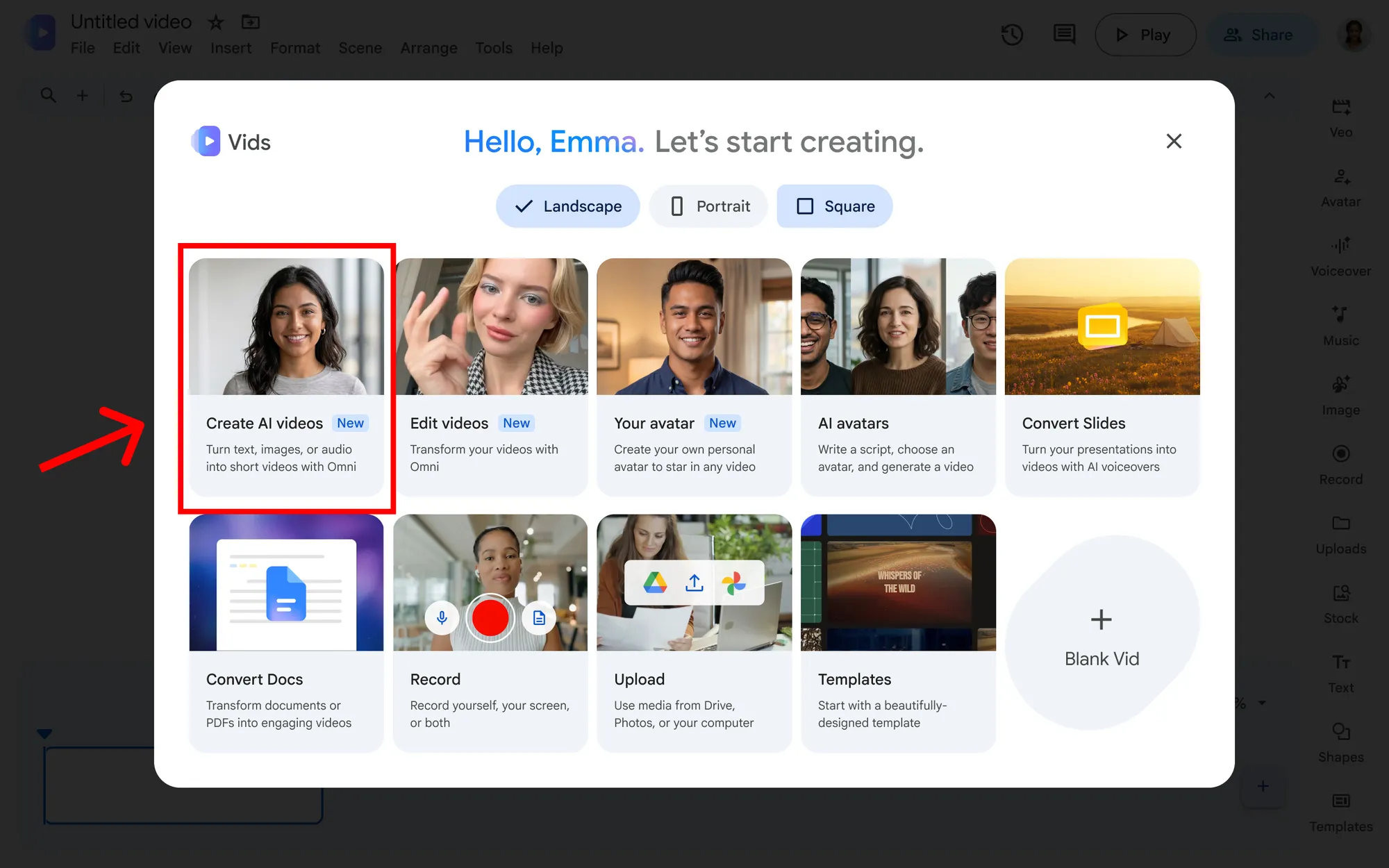
Until now, AI video generation has often felt like pulling a slot machine lever: you enter a prompt, cross your fingers, and hope the AI spits out something close to your vision. If it doesn't, you start over.
Gemini Omni 1.1 in Google Vids shifts this dynamic entirely. It moves the user from the role of a passive "prompter" to an active director. This means you have meticulous control over your video from the initial concept all the way to the final export. You aren't just generating random clips; you are crafting a cohesive narrative. While you’re still prompting to make edits, you don’t have to generate a new video every time if one detail or image is wrong.
Extend Scenes with Smooth Transitions
One of the most frustrating aspects of early AI video tools was the inability to create longer, continuous shots without the scene breaking or morphing into something unrecognizable. With Omni 1.1, you can extend your scenes seamlessly. The AI intelligently maintains the visual context, lighting, environmental details, and the appearance of your characters. Whether you need a lingering shot to emphasize a dramatic moment or a continuous pan across a landscape, the transitions remain flawlessly smooth.
Super-Specific Durations for Perfect Timing
Timing is everything in video editing. A shot that lingers a second too long can ruin the pacing of your entire project. Google Vids now allows you to set incredibly specific clip durations. This precision is invaluable when you need your visuals to align perfectly with a voiceover, a specific beat in your background music, or the rhythm of your story. You dictate the pace, ensuring the final product feels polished and professional.
High-Definition Generation and Upscaling
Quality matters, especially when representing a brand or business. Gemini Omni 1.1 allows you to generate brand-new AI video scenes in crisp, full 1080p HD. But it doesn't stop there. If you have existing AI clips that are lower resolution, you can use the model to upscale them so they blend seamlessly across your timeline, ensuring your entire video maintains a unified, high-quality aesthetic.
Legally Use Anything in Google’s Stock Library
If you click on “Stock” in the right-side toolbar in Google Vids, you will see a vast array of stock video and images you can use, some of which are from services that require you to pay for stock image or video use. Any older marketing professional who has either received a legal letter from a stock photo service or knows someone who has, so you’re probably wondering if it is actually legal to use these stock assets in a video for your business.
Google’s guidelines are pretty clear; you can use these stock assets for commercial purposes, as long as you do not use or sell them on a standalone basis. For example, you may not be able to use a stock video on its own, but if you add your logo to it, you can use it.
What you cannot use these assets for are logos or anything that you are going to trademark.
Built for Any Size of Business and Marketing Team
The true power of creating your video with Google is versatility. Here is how different users can leverage this technology:
- The Side Hustler and Solopreneur: Launching a product is stressful enough without having to worry about video production. Side hustlers can now pick from ready-to-use video templates, inject their branding, and launch their next big idea without manually editing a single frame.
- The Local Business Owner: You don’t need a production crew to show off your inventory. A boutique owner can snap a few quick photos of their new arrivals, upload them to Google Vids, and let the AI instantly transform them into a dynamic, engaging promotional video perfect for socials.
- Enterprise Marketing Teams: Scaling video content is a major pain point for large companies. Marketing teams can now rapidly produce eye-catching videos for landing pages, social media announcements, and digital event signage, freeing up their creative teams to focus on higher-level strategy. Just feed an already existing video into Google vids to resize it for any social media or other channel, or incorporate more video into everything now that it doesn’t cost the annual marketing budget to do it.
Creativity Meets Transparency: The Role of SynthID
As AI video generation becomes indistinguishable from reality, transparency is more crucial than ever. Google is ensuring that this creative power is used responsibly.
Every single clip generated with Omni 1.1 in Google Vids includes an imperceptible SynthID digital watermark embedded directly into the video frames. This advanced watermarking technology does not disrupt the viewing experience, but it allows viewers and platforms to verify that the content was generated using artificial intelligence. It’s a vital step in maintaining trust and ensuring that viewers always have context about the media they are consuming.
A Glimpse into the Future: Breaking the Language Barrier
The visual upgrades are the beginning. Coming soon, Google Vids will integrate the Gemini 3.8 Flash-Lite text-to-speech model. This will allow you to turn any typed script into a natural-sounding voiceover.
Even more impressive, this narration capability will be available in more than 100 languages.
Imagine being a small business owner who can now seamlessly translate and narrate their promotional videos for a global audience with just a few keystrokes. It completely removes the need for expensive recording equipment, voice actors, or translation services.
Start Building Your Vision Today
The era of expensive video production is now over, unless of course you need someone to record a live interview or event. The tools to create cinematic, engaging, and professional stories are now sitting right in your browser.
Whether you are looking to manage a global marketing campaign, explain a complex concept, or simply share a story with your community, the barrier to entry has officially been removed.
Anyone with a Google Workspace account can experience this for themselves. For teams that require greater capacity, centralized admin controls, and expanded video generation amounts, Google offers tiered access through their Google AI plans and Workspace Business/Enterprise plans. Contact us today to make sure you have the right-sized Google Workspace edition for the amount of videos you want to generate each month.
Contact Us to Learn More about Transforming Your Business