
If you've ever opened your Google Calendar just to find it littered with shady event invitations for "Free iPhones," crypto seminars, or relentless meetings from a salesperson who won't take a hint, relief is finally here. Google is officially rolling out a highly requested feature: the ability to block specific users from sending you Google Calendar invites.
How the New Blocking Feature Works
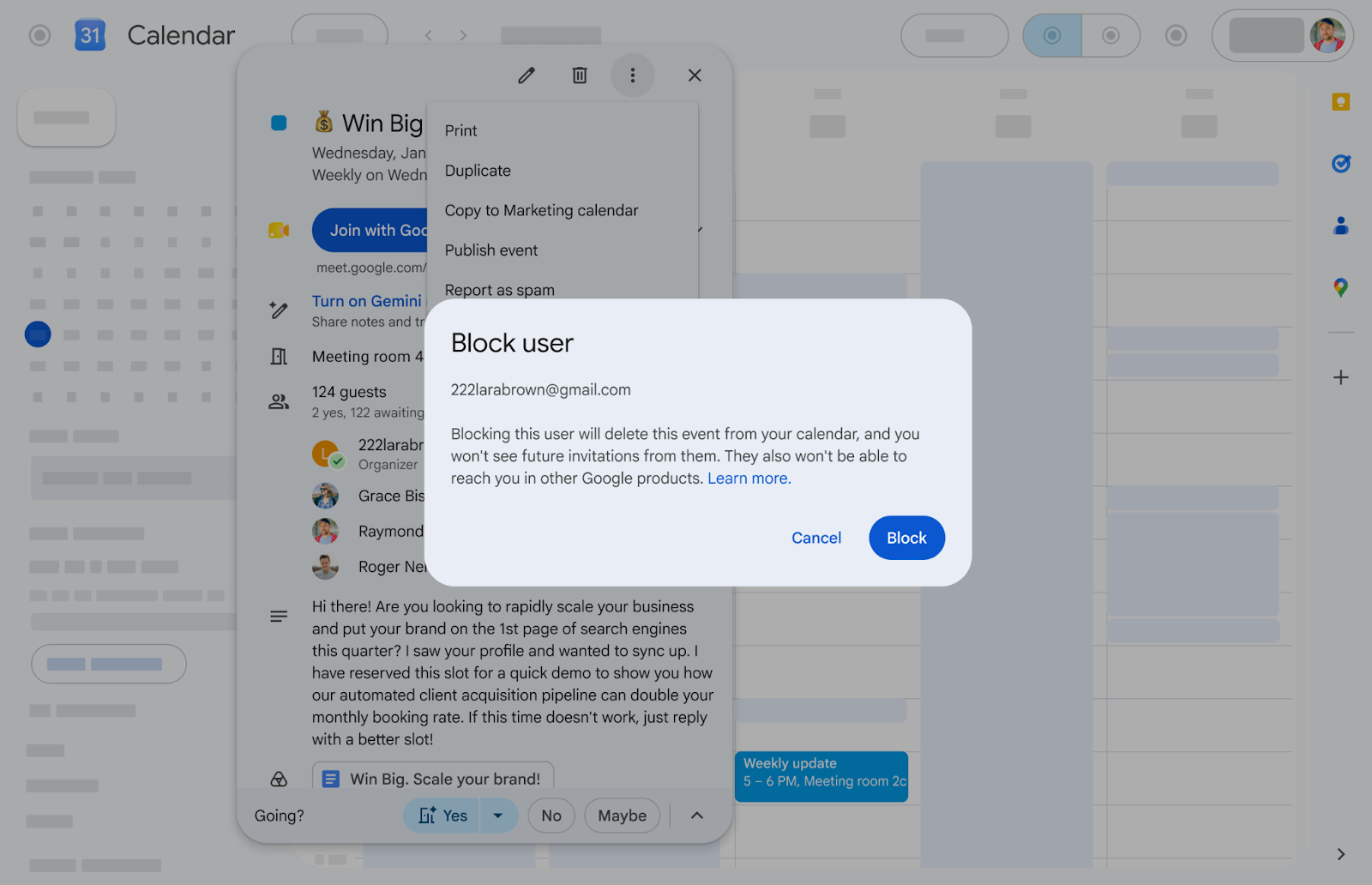
Open the unwanted event invite, click the three-dot menu icon, and select "Block."
There is one important caveat to this new feature: it only works if the person spamming you is using a Google account, or email on a domain hosted by Google (which is technically a Google account).
According to the Google Workspace Updates blog, here is what happens when you hit that button:
- The moment you block the user, the invite you are currently looking at is automatically removed from your calendar.
- You will no longer receive any new calendar invitations from that person.
- When you block an individual in Google Calendar, they are added to your account-wide blocklist. This means they are blocked from interacting with you across all supported Google products (like Google Drive or Google Chat). Similarly, if you previously blocked someone in another Google app, they are automatically blocked in Calendar now too.
If the spammer is sending calendar invites from a non-Google email address (like Yahoo or a custom domain not hosted by Google Workspace), the Calendar block button won't work. For those situations, Google advises using Gmail’s blocking functionality. Blocking their email address in Gmail will stop all emails from them, including the ones that automatically generate Calendar events.
Up until now, you did have the option to block calendar invites from unknown senders, but that’s a bit too limiting for most businesses and especially anyone who is client facing. You can also edit your settings to only add events when you respond to the invitation email under Event Settings in Calendar, but again that can limit activities for anyone who is client-facing.
How to Block Someone in Gmail

Here’s how to do it if your spammer doesn’t have a Google account. Gmail doesn’t have a traditional blocked sender list that you can randomly add an email to; you have to reply to an email someone has sent to you. Luckily, this can be your Google Calendar invitation. Just hit the “More” menu item next to “Reply” and select “Block”. They will not receive a notification that they are blocked. This support article describes how to do it on a computer and other devices.
This feature is rolling out to all Google Workspace customers as well as Workspace Individual subscribers and users with personal Google accounts by the end of September.
Why It’s a Security Matter to Block Calendar Invites
Spammers are getting creative, but the majority of “spam” calendar invites are phishing attempts to steal personal information. Why do hackers like them? They sync across devices, and fill up your calendar with how to send gift cards to pay your IRS bill and other “helpful” tips. You should also have multi-factor authentication on your Google account as a baseline level of security.
Do you want to lock down your Google Workspace accounts and make them more secure? Contact Upcurve Cloud; we can help ensure that your business can easily operate while being protected in the background. From training to administrative fixes, we can lock down Google Workspace for you.
Contact Us to Learn More about Transforming Your Business