The agentic era of AI is here. Organizations are deploying advanced generative AI features and autonomous agents to manage complex workflows, analyze confidential data, and accelerate productivity across teams.
With this massive wave of AI adoption comes a critical question for IT administrators and security teams: how do we keep our data secure, compliant, and under control while giving our users the tools they need?
Google’s answer is the all-new AI Control Center. Integrated directly into the Google Workspace Admin console, this centralized hub is a major milestone for enterprise security, providing a "single pane of glass" to manage how both first-party and third-party AI solutions interact with sensitive company data.
What is the AI Control Center?
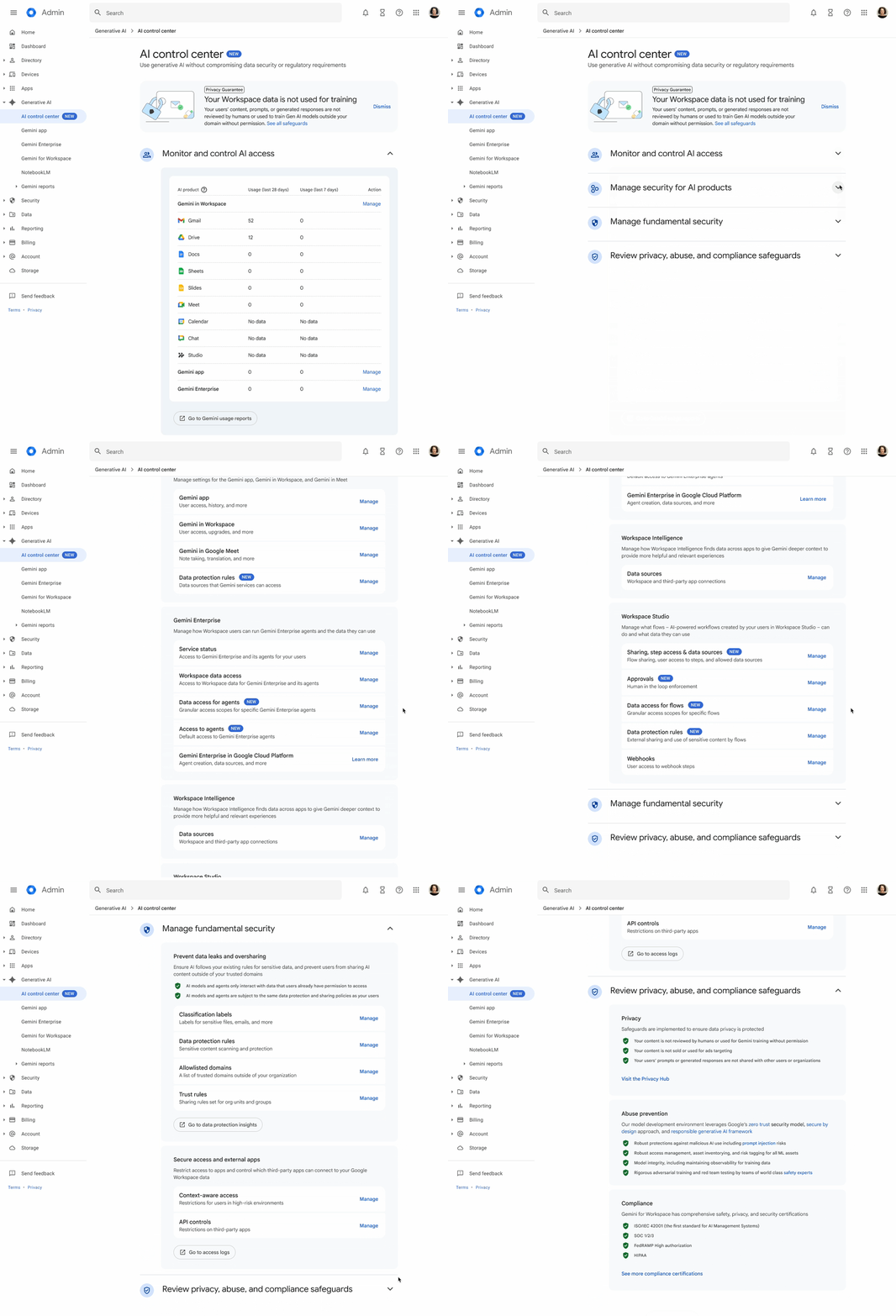
The AI Control Center is a centralized dashboard designed to provide enterprise organizations with unmatched visibility and granular control over generative AI and agent actions within Google Workspace.
For teams with strict compliance, legal, or data security requirements, this removes the guesswork. Instead of hopping between various settings to adjust permissions for Docs, Gmail, or Meet, admins can manage everything from a unified interface.
Google has structured the dashboard into four core modules, each designed to address a fundamental pillar of modern AI governance:
1. Monitor and Control AI Access
Before you can secure AI usage, you have to see it. This module provides immediate visibility into exactly who is using AI within your organization. It aggregates data across Google Workspace, serving up direct links to Gemini usage reports and core management settings.
2. Manage Security for AI Products
Not all departments have the same security needs. This module grants admins granular authority over specific AI features. For instance, you can fine-tune data and security policies specifically for Gemini in Google Meet without disrupting how Gemini behaves in Google Docs. It ensures that every AI touchpoint complies flawlessly with your domain’s unique regulatory environment.
3. Manage Fundamental Security
One of the biggest anxieties surrounding enterprise AI is data leakage or accidental oversharing. The AI Control Center tackles this by anchoring AI usage into your existing, foundational security protections. It surfaces critical tools like classification labels, trust rules, and data protection rules directly within the AI dashboard. This ensures that if a document is confidential, an AI agent treats it with the same restrictions a human would.
4. Review Privacy, Abuse, and Compliance Standards
Trust is the ultimate currency in enterprise SaaS. This module serves as a direct line to Google’s guaranteed safeguards. It allows admins to audit the "Secure by Design" architecture and explicitly review Google's commitment: your organization's data is private and is never used to train public models.
Certain upcoming controls and features will be explicitly marked as “Coming soon.” This gives admins the unique ability to map out long-term rollouts, prep internal training, and align security strategies before new agentic capabilities drop.
Availability: The AI Control Center has completed its initial rollout phase and is available for eligible domains with Gemini Enterprise. It’s available to admins in the Google Admin console under Generative AI > AI control center. End users don’t need to do anything and they don’t require access.
As AI evolves from simple assistants into powerful, independent agents, the role of the IT admin is shifting from gatekeeper to enabler. If you need the granular controls that AI Control Center has, you just found another reason to upgrade to Gemini Enterprise. AI Control Center is just one of the many AI upgrades that are unlocked with Enterprise, and we can help you upgrade and implement all of them across your business. Contact us today!
Contact Us to Learn More about Transforming Your Business